Free WordPress plugin · v1.0.0

Your website, after midnight.

Lightning, rain, fog, ghosts, bats, and pumpkins your visitors can grab and throw. Free WordPress plugin. No theme edits.
  • Free & open source
  • No theme edits
  • Zero cost when off
  • Privacy-friendly

WordPress 6.3+ · PHP 7.4+ · GPLv2 or later

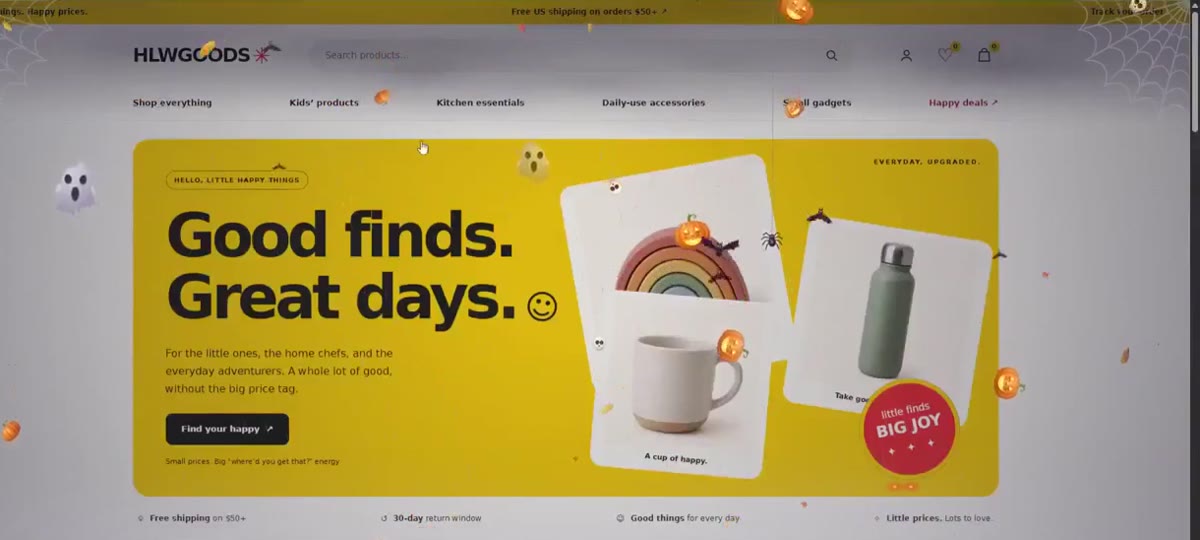
A WooCommerce store homepage with Halloween WT running: a soft dark vignette, cobwebs in the corners, glowing pumpkins, ghosts and bats drifting over the page while the content stays readable.
My demo store with the Normal preset. Same theme, same content.
Before / After

Same site. One switch.

This is the shop page of my demo WooCommerce store, captured at the same scroll position. On the right, Halloween WT is running with the Normal preset. Drag the pumpkin handle.
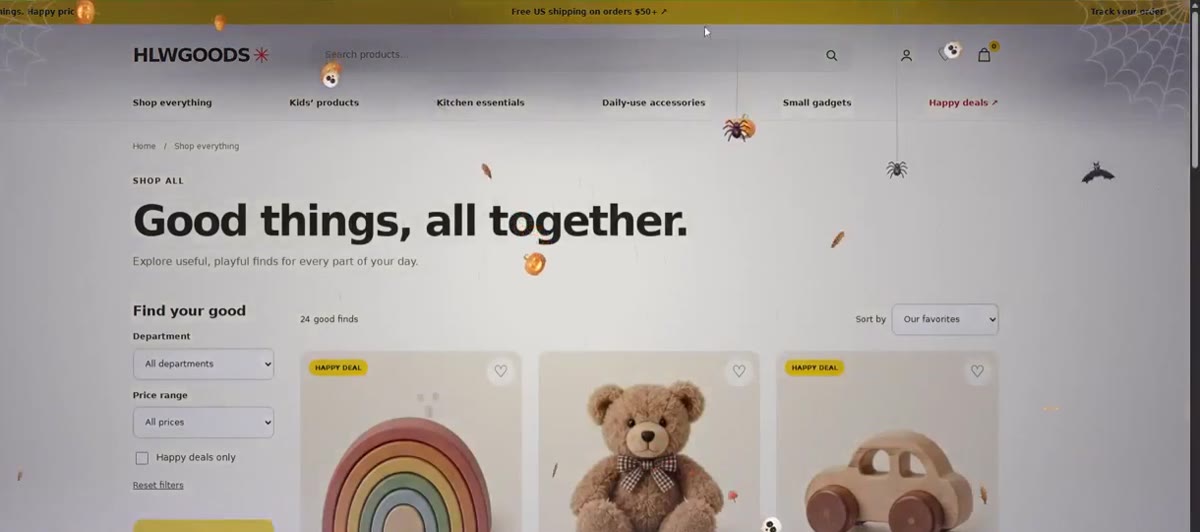
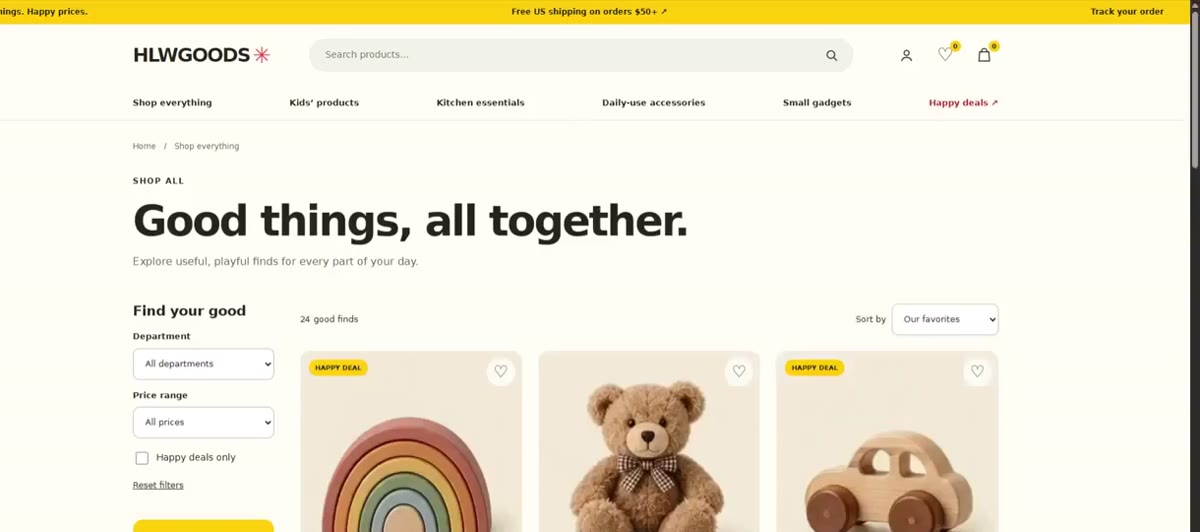
Shop page with Halloween WT: darker edges, cobwebs, spiders hanging on silk threads, bats and falling leaves. The same shop page without the plugin. Before After

Same site. Same content. Zero theme edits. Menus, filters and the cart icon still work under the effects.
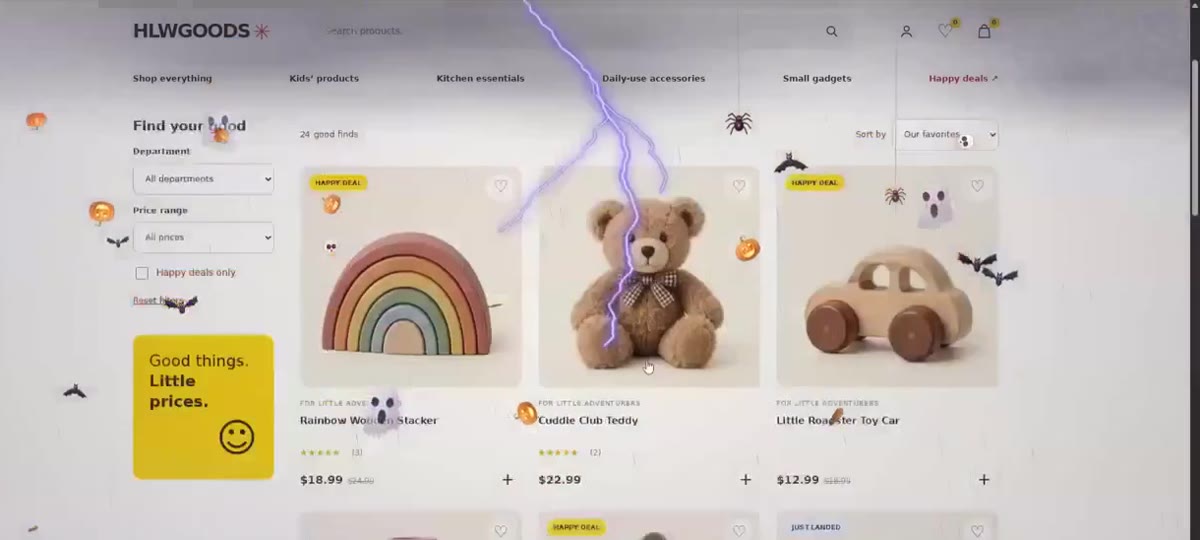
A branching lightning bolt cracking across the product grid while bats and ghosts drift past.
A lightning strike over the product grid.
Homepage hero with glowing pumpkins, ghosts and bats over a yellow banner.
The homepage hero. The banner text stays readable.

Watch it live in 38 seconds

A screen recording of the plugin on a real WordPress store: the homepage, the shop grid, and what happens when you switch it on.

The fun part

Go ahead, grab a pumpkin.

Most Halloween plugins are something you look at. This one you can play with. Mouse, touch and stylus all work.


  • Throw a pumpkinIt falls with gravity, bounces and rolls.
  • Drag the ghostIt glides, then floats gently back up.
  • Pull the spiderIt swings like a pendulum on its silk.
  • Tap a batIt gets scared and flees.
Hollow Oak BakeryBreadsPiesVisitCart (0)

Pumpkin bread, baked every morning.

A sample website, sitting under the effect layer. Everything on it is clickable.

Button clicked: 0 times

See? The button still works. The layer only reacts in the small grab zone in the middle of a few objects.

Features

Fourteen effects. Each one has its own switch.

Turn any of them on or off, then tune quantity, size, speed, opacity, intensity or color where it makes sense. Hover a card to see it move.

Atmosphere

7 effects

Thunder & lightning

Branching bolts that light up the darkness. Rare, occasional or frequent.

Darkness vignette

Darkens the edges. The reading area stays light.

Rain

Slanted storm rain.

Storm clouds

Drift along the top edge.

Fog

Low mist that never covers the middle. Custom color and height.

Eyes in the dark

Open near the edges, blink, and vanish.

Particles

Tiny glowing embers rising slowly.

Creatures & decoration

7 effects

Pumpkins

Glowing jack-o'-lanterns. Your visitors can grab and throw them.

Bats

Fly on wavy paths. Tap one and it flees.

Ghosts

Friendly, translucent. Drift, then fade.

Spiders

Lower themselves on silk threads.

Spider webs

Sit quietly in the top corners.

Skulls

Tumble slowly through the night.

Autumn leaves

Maple, oak and elm.

Presets

Four moods, one click.

Normal default

The full stormy night, balanced.

Pick a preset, then fine-tune anything you like.

Hollow Oak BakeryBreadsPiesVisitCart (0)

Open late on Halloween night.

Your content stays exactly where it is. The effects sit on a layer above it.

The promise

Your website always comes first.

Your visitors will smile, play, and remember your site, and you didn't touch a single line of your theme.

Never blocks clicks

Menus, buttons, forms, sliders and checkout keep working. Only the tiny grab zone in the middle of a few objects reacts to the pointer.

Zero cost when off

Disabled, scheduled for later, or excluded on the current page? Then nothing loads at all.

Self-healing

If anything ever goes wrong in the animation, the layer quietly removes itself. The page keeps working.

Cart & checkout protected

Cart, checkout and account pages are effect-free by default, so your sales are never disturbed.

Live preview & control

See every change before you save it.

  • Live previewDesktop and mobile toggle, pause button. Every slider updates the preview instantly. Admins can also preview on the real site before going live.
  • Schedule with yearly repeatRun whenever enabled, or between two dates. Tick "Repeat every year" (say Oct 20 to Nov 1) and it comes back every Halloween. Uses your site's timezone, no cron jobs.
  • TargetingEntire site, homepage only, or selected pages and posts. WooCommerce shop and product pages. Exclude anything.
  • Mobile controlsSeparate toggles for effects and interaction on mobile, plus Low, Medium or High density. Phones always use reduced limits to protect battery and scrolling.

Halloween WT

Live on your site
Live preview
Hollow OakBreadsPiesVisit

Pumpkin bread, baked daily.

Preview of your homepage.

An HTML recreation of the settings screen, so you can try the controls here. The real screen has the same eight tabs.

Performance · Accessibility · Privacy

The fine print, in numbers.

Performance

0files loaded when off
1canvas for every effect
~15fps for slow layers like fog
  • Scripts load deferred, after your page has finished loading.
  • Artwork is rasterised once and reused every frame.
  • Pauses in hidden tabs. Frame rate capped on 120/144 Hz screens.
  • Lowers detail automatically on slow devices.

Accessibility

2flashes max per strike
8 sminimum between strikes
0keyboard focus stops
  • Respects "reduce motion" (on by default): only calm, static decoration.
  • Never three or more flashes in a second.
  • Hidden from screen readers.
  • Hidden when printing and in high-contrast mode.

Privacy

0cookies
0external requests
0tracking
  • Collects, stores and sends no visitor data.
  • No third-party services or libraries.
  • All artwork is original and bundled with the plugin.
Compatibility

Works with what you already use.

Effects hide automatically inside page builder editors, so they never get in the way while you edit.

WordPressWooCommerceElementorDiviBeaver BuilderBricksBlock themesClassic themesMultisite
For developers · functions.php
// Hide the effects from logged-in users
add_filter( 'halloween_wt_should_load', function ( $load, $settings ) {
	return is_user_logged_in() ? false : $load;
}, 10, 2 );

Zero dependencies, zero build step, one option (halloween_wt_settings), translation ready.

Install

Live in about a minute.

  1. Download the ZIP

    Open the GitHub repository and choose Code → Download ZIP.

  2. Upload and activate

    In WordPress go to Plugins → Add New → Upload Plugin, choose the ZIP, then click Activate.

  3. Enjoy the storm

    Effects start right away with the Normal preset. Customise everything in Settings → Halloween WT.

Requirements: WordPress 6.3+ · PHP 7.4+

FAQ

Questions before you install.

Will it slow my site?
Effects load only after your page has finished loading, are drawn on a single canvas, pause in background tabs and lower their detail automatically on slow devices. When effects are off, nothing loads at all.
Will it block my menus, buttons or checkout?
No. The effect layer ignores the mouse everywhere except the small grab zone in the middle of a few interactive objects. Cart, checkout and account pages are effect-free by default.
Does it work with my theme or page builder?
It works with block and classic themes, and with Elementor, Divi, Beaver Builder and Bricks. Effects hide automatically inside page builder editors. WooCommerce and multisite are supported too.
I use a caching plugin. What should I know?
Clear your page cache after you change settings, so visitors get the new version. When a schedule ends, cached pages stop showing the effects by themselves.
Can I disable it on one page?
Yes. Exclude any page or post under Where to show effects. Developers can also use the halloween_wt_should_load filter.
What happens when I uninstall?
Deactivate it and your site is exactly as it was. Delete it and it removes its single settings option. Nothing else.
Is it really free?
Yes. Free and open source under GPLv2 or later, forever. If it made your October more fun, a coffee is always welcome.

Free, and it always will be.

Halloween WT is free and always will be. If it made your site a little more fun this October, buy me a coffee. It keeps the updates (and the pumpkins) coming.